Samsung One UI Home
Screenshots
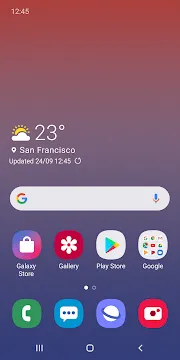
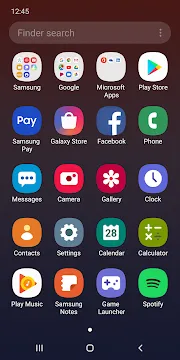
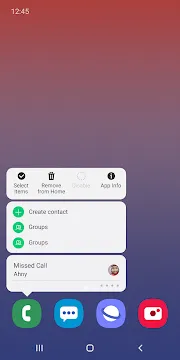
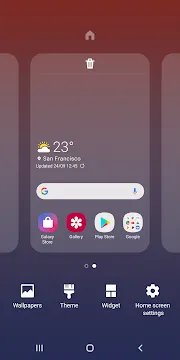
Samsung One UI Home coordinates your entire smartphone interaction. This official launcher manages your main screens, widgets, and menus seamlessly. Therefore, you can access your daily tools with ease. Many people do not realize how much this tool affects mobile performance. However, a smooth screen changes how you use your phone.
This detailed guide explores the setting options of the app. We will cover excellent tips to help you maximize your daily phone navigation. Samsung updates the app constantly to improve system speed. Consequently, users get a clean interface and fast response times. You can modify almost every visual element to fit your taste. Let us explore how this software optimizes your daily workflow.
What Is Samsung One UI Home?
Samsung One UI Home is the default interface layer for Galaxy mobile devices. It acts as the visual foundation for your user experience. When you unlock your device, you see this tool immediately. The app controls how icons appear on your display. Furthermore, it organizes how you browse your installed utilities. Samsung created this option to replace older, slower software systems. As a result, users enjoy a much cleaner design now.
The main philosophy behind this software centers on comfort. It places important interactive elements near the bottom of the screen. Because screens grow larger every year, one-handed use becomes difficult. This interface solves that problem directly. You can swipe down anywhere to open your notifications panel. Thus, your thumb does not have to reach the top. This simple design logic improves comfort during long periods of phone use.
Additionally, Samsung One UI Home runs deeply within the system memory. This deep integration ensures that transitions look exceptionally smooth. Third-party alternatives often consume too much battery power. In contrast, this built-in tool uses minimal battery. It works harmoniously with the background processes of your hardware. Therefore, your device remains responsive even during heavy multitasking sessions. It remains stable under all conditions.
Essential Features of the Stock Launcher
The native layout engine contains multiple tools that enhance utility. Users can modify how many items fit onto a single screen page. For example, you can select a dense grid like five by six. This selection allows you to see more icons at once. Alternatively, a smaller grid gives you a cleaner visual layout. You can adjust these settings by pinching the home screen.
Another significant element is the app drawer configuration. You can hide specific tools that you do not use often. This option keeps your private information safe from prying eyes. Moreover, you can sort your apps alphabetically. This sorting method helps you locate files quickly. If you prefer folders, you can group similar tools together easily.
Let us look at some core features:
- Customizable grid sizes for screens and drawers.
- Hidden app options for increased personal privacy.
- Dynamic notification badges on top of individual icons.
- Smooth full-screen gesture options for modern navigation.
- One-press access to detailed app information sheets.
These specific functions require no extra software downloads. Because they are native, they rarely crash or lag. Consequently, you can rely on them for daily productivity tasks. Many people prefer these features over complex third-party tools. They enjoy a simplified smartphone experience.
How to Customize Samsung One UI Home
You can alter Samsung One UI Home to match your personal style perfectly. First, touch and hold any empty space on your display. This action opens the main options menu immediately. From here, you can select new wallpapers or color palettes. The color system matches your wallpaper tones automatically. Therefore, your entire device looks visually unified.
Next, consider using custom widgets to show live data. You can add a calendar widget to track your meetings. Furthermore, weather widgets give you real-time temperature updates. You can resize these blocks by dragging their outer edges. This flexibility allows you to build a truly unique layout. Many users combine multiple widgets to save precious screen space.
To maximize your styling options, follow these helpful steps:
- Open the settings panel by pinching the display.
- Select the wallpaper options to pick fresh backgrounds.
- Turn on the lock layout option to secure icons.
- Adjust the background transparency of your custom folders.
- Apply new themes from the official store.
Finally, remember to lock your final home screen layout. This setting prevents accidental changes to your icon placement. Children or accidental touches will not ruin your careful organization. Thus, your configuration remains intact permanently. You will save time by knowing exactly where everything sits.
Why Samsung One UI Home Updates Matter
Regular updates for Samsung One UI Home fix bugs and introduce useful tools. Tech developers refresh this software code frequently to patch vulnerabilities. If you ignore updates, your device might face slow animations. Therefore, checking for software updates ensures optimal phone health. You can find these updates inside the official Galaxy Store.
Furthermore, new updates often refine the appearance of your icons. Recent versions shortened app labels to a single line. This change creates a much cleaner visual presentation. Additionally, updates improve how the system handles gesture navigation inputs. For example, moving between multiple screens feels much faster now.
To update the system software, use the following steps:
- Launch the Galaxy Store app from your menu.
- Tap the menu icon located at the bottom.
- Select the updates section to scan your device.
- Find the specific entry for Samsung One UI Home.
- Press the update button to install the latest files.
Because updates resolve hidden software conflicts, your phone performs better over time. Security patches protect your personal information from external threats. Meanwhile, performance upgrades keep the user interface feeling brand new. Your device operates at peak performance after every update cycle.
Conclusion
Samsung One UI Home offers an excellent balance of personalization and speed. This built-in launcher provides deep software integration that third-party options cannot match. Because it uses minimal system battery, your device remains highly efficient. You can customize your layout with various grids, folders, and custom widgets. Therefore, managing your phone layout becomes a simple and enjoyable process.
Regular updates keep the launcher stable and completely secure. By using these features wisely, you improve your daily productivity. You do not need complex replacement launchers to get a clean layout. Trust the native tools to keep your smartphone running smoothly. Ultimately, this software ensures a reliable and highly comfortable user experience every single day. It remains the ideal choice for Galaxy owners.
- NetCut
- POCO Launcher
-
Samsung Wallpaper services
 Download
Samsung Wallpaper services
Samsung Wallpaper services provides automated background updates...
- Digital Wellbeing
- Android AICore
- Xiaomi Scanner
- Komi Store
- AdGuard VPN